

Why Does My AI Listing Description Sound Fake?

Quick Read (the whole post in six bullets):
Your AI copy sounds fake because the prompt was generic. With only beds, baths, and a city to work from, AI fills the gaps with the average of every listing it has ever read.
Most descriptions are a feature list written for the tax record. Buyers do not buy features, they buy the feeling of walking in and knowing this is the one.
Feed AI four things before it writes: the real home, the neighborhood, the likely buyer, and your brokerage-approved voice.
"Walkable" means something different in every market, and AI cannot know which one you mean unless you tell it. That local read is the thing no tool has.
The fix is a two-prompt system: a Claude project folder plus one trip through Perplexity for real neighborhood research, then three finished versions.
AI compresses an hour of writing into a few minutes. You still supply the local opinion and the final read. Use it to enhance your voice, not replace it.
You paste your listing address into AI, ask for a description, and what comes back could be about any house in any city. It is flat, a little padded, and a little too smooth. Agents have a word for it, and the word is slop.
The frustrating part is that the tool is not failing you, and you are not bad at prompting. The AI was handed almost nothing to work with, so it filled the gaps with the average of every listing it has ever read. This post walks through why that happens and the exact system I teach to fix it.
Why your AI listing description sounds fake
When agents send me their AI copy and ask why it sounds off, the reason is almost always the same.
The prompt was generic, so the output was generic. If you type "write a listing description for a 3 bed 2 bath in Dallas," the AI has no idea what your home actually feels like, who is likely to buy it, or how your brokerage lets you talk about a school district. So it reaches for the safest, blandest version of a description, the one that fits ten thousand houses at once. That average is the fake sound you are hearing, because it is not writing about your listing. It was never told what your listing is.
The deeper issue underneath the generic prompt is that most descriptions are built to describe the wrong thing.
Buyers don't buy features, they buy the feeling
Think about the last description you wrote under deadline. It probably opened with the bed and bath count and listed features in the order they show up on the tax record.
That is a feature list, and a feature list is written for the record, not the buyer. Buyers do not fall in love with "3 bed, 2 bath, open floor plan, updated kitchen." They fall in love with the feeling of walking in and knowing this is the one. AI is good at that reframe, taking the same facts and pointing them at emotion instead of specs. "Open floor plan with updated finishes" becomes the picture of everyone ending up in the kitchen every time people come over. Same facts, different frame.
That reframe only works when the AI has real material to build the feeling from, which is where most agents come up short.
The four things you have to feed AI
A description sounds market-real when the AI knows four things before it writes a word.
The first is the actual home, not just the specs but what makes this one different, like the fact that the primary bedroom catches the morning light or the backyard runs to a greenbelt. The second is the neighborhood, what it is known for and what the people who live there love about it. The third is the buyer profile, who is most likely to write the offer, because a young professional and a growing family need to hear two different stories about the same house. The fourth is your brokerage-approved language and your own voice, so the copy sounds like you and stays inside the rules you have to follow.
Three of those four are things only you can supply, and the neighborhood piece has a trap in it that AI falls into every time.
"Walkable" means something different in every market
Ask AI to describe a neighborhood and it will reach for words like walkable, charming, and up-and-coming without knowing what any of them mean where you sell.
Walkable in a Dallas suburb means you can walk the kids to the elementary school and grab a coffee on the corner. Walkable in a downtown high-rise means bars, transit, and a grocery store on the ground floor. Those are two different promises to two different buyers, and AI cannot tell which one you mean unless you tell it. This is the local opinion that no tool has, the read that only comes from working the area. When you feed that in, the copy stops sounding like a template and starts sounding like someone who lives there.
The good news is there is a simple system that pulls all four inputs together, and I teach it in two prompts.
The two-prompt system I teach for listing descriptions
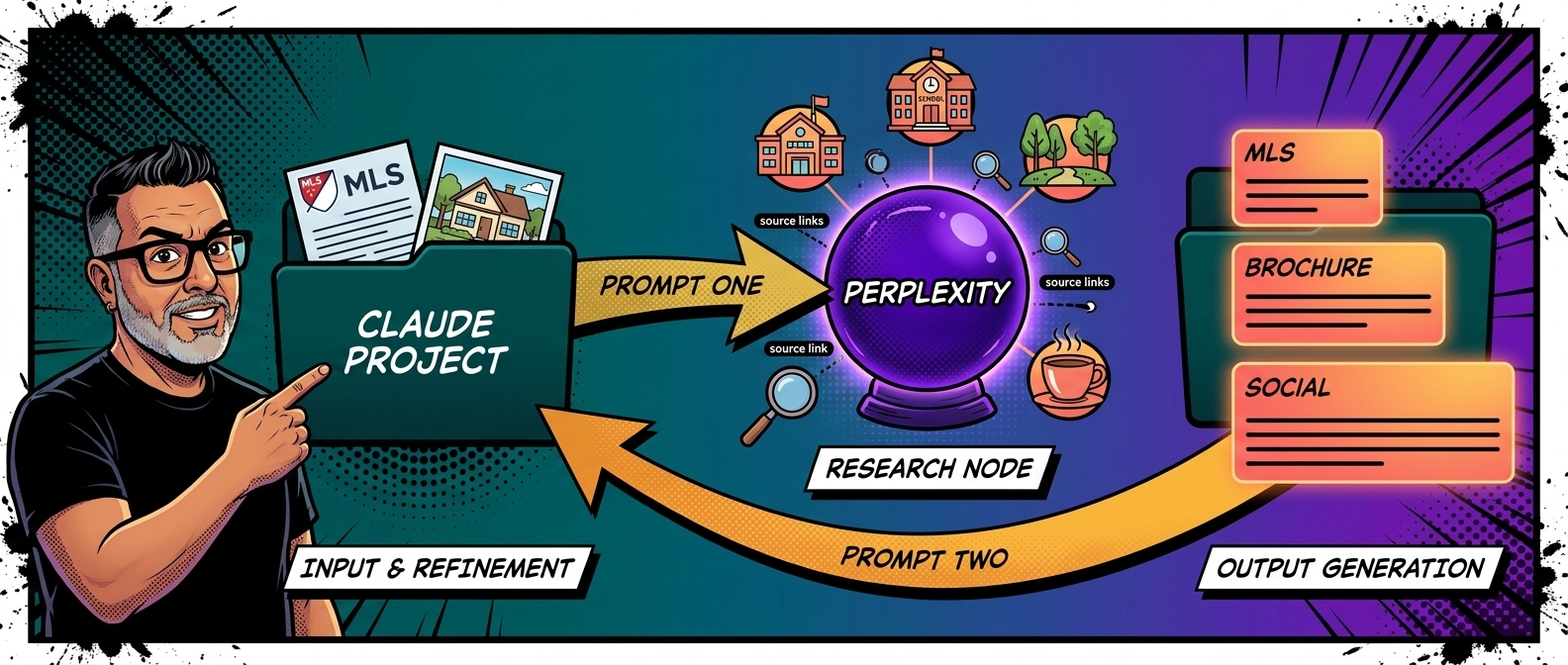
This is the exact workflow I walk my classes through. It uses a Claude project folder and one trip through Perplexity, and it takes a few minutes once you have done it a time or two.
Start by creating a project folder in Claude for the listing, then upload your MLS data into it. That can be a copy and paste of the listing details, the MLS printout saved as a PDF, or a typed summary of the key facts. You can add the photos too.
Step one: Claude builds your research prompt
You run the first prompt inside the project. Claude reads the listing data and writes a Perplexity research prompt built for that exact property and price point. Here is the prompt to paste in:
You have access to the listing information for this property in the project folder. Read it carefully before doing anything else. Your job is to generate a Perplexity research prompt I can copy and paste directly into Perplexity to gather neighborhood and city intelligence for this listing. The research will be used to identify the most likely ideal buyer for this property and to write a listing description that speaks directly to that buyer. Before generating the prompt, answer these questions internally based on the listing data in the folder: What city, neighborhood, and zip code is this property in? What price point is this listing at and what does that suggest about the buyer's income and lifestyle? What features of this property stand out as most likely to appeal to a specific type of buyer? What life stage does this home most likely fit: growing family, empty nester, young professional, move-up buyer, luxury buyer, or something else? Now generate a Perplexity prompt that asks for the following about this specific city, neighborhood, and zip code: Who typically buys homes in this area and at this price point? Describe the buyer demographics, lifestyle, and motivations. What is this neighborhood known for and what do residents love most about living here? What are the top schools, restaurants, parks, and amenities within a reasonable distance of this zip code? What is currently happening in this area in terms of development, growth, or community changes that a buyer would want to know? What do people moving to this area from out of town typically say surprised them in a good way? Format the Perplexity prompt so I can copy it directly and paste it into Perplexity without any editing. Start the prompt with the words: Research the following about [city], [neighborhood], [zip code] in [your state].
Step two: run the research in Perplexity
Copy the prompt Claude gives you, paste it into Perplexity, and run it. Perplexity pulls current neighborhood and city intelligence with sources, which is the local grounding the description needs. Copy the full output when it finishes.
Step three: Claude writes three versions
Come back to the same project folder, paste the Perplexity results into the conversation, and run the second prompt. Now Claude has both the listing facts and the neighborhood research, and it writes three versions aimed at the ideal buyer. Here is that prompt:
You now have two sources of information available to you in this conversation. First, the listing data for this property from the project folder. This includes the factual details about the home including the address, price, beds, baths, square footage, features, and any additional notes. Second, the Perplexity research results I just pasted above. This includes information about the neighborhood, the city, the typical buyer for this area, the lifestyle, the amenities, and what people love about living here. Your job is to write three versions of a listing description for this property. Each version should weave together the factual listing details and the neighborhood and city intelligence to create a description that speaks directly to the most likely ideal buyer for this home. Here are the rules for all three versions: Never start with the number of bedrooms or bathrooms. That is a feature list, not a story. Open with the feeling of the home or the lifestyle it enables before naming a single spec. Use the neighborhood and city research to ground the description in a specific sense of place. The buyer should be able to feel what it is like to live there, not just what the house contains. Write in a warm, direct voice. No exclamation points. No real estate clichés like dream home, entertainer's paradise, or nestled. End with a sentence that creates a clear reason to schedule a showing, not a generic call to action. Version One: Short form. Under 150 words. Built for MLS character limits. Version Two: Medium form. 200 to 300 words. Built for marketing brochures and property websites. Version Three: One opening paragraph only, 50 to 75 words, built as the hook for social media or a listing video script. After all three versions, write one sentence explaining which buyer type you wrote these descriptions for and why, based on the listing data and the Perplexity research.
You end up with a short MLS version, a medium brochure version, and a social hook, all built for the same buyer. What you do with them next is the part that matters most.
Use AI to enhance your voice, not replace it
The system above compresses an hour of writing into a few minutes, and that is the real value.
What it does not do is remove you from the work. You are the one who supplied the local read, chose the buyer, and knows whether the copy actually sounds like your market. Before any of the three versions goes live, you read it, cut anything that rings false, and make it yours. The AI gave you a strong starting point in a fraction of the time, and you give it the judgment and the voice that make it real.
That is the whole point, and it is worth saying plainly.
Wrapping it up
The tool was never the problem, the empty prompt was.
When you feed AI your actual home, your real market, and your own voice, it stops handing you slop and starts handing you a first draft worth finishing. Use it to move faster, stay the one who signs off on the words, and your listings will sound like they came from someone who knows the street, because they did.
Frequently Asked Questions
Q: Why do my AI listing descriptions sound generic or fake?
A: Because the prompt was generic. If you only give AI the beds, baths, and city, it fills the rest with the average of every listing it has read, and that average is the bland sound you are hearing. It gets specific only when you give it the specific home, neighborhood, buyer, and voice.
Q: What information should I give AI to write a good listing description?
A: Four things. The real details of the home, what the neighborhood is known for, the buyer most likely to make an offer, and your brokerage-approved language and voice. Feed it those and the copy stops sounding like a template.
Q: What is the best prompt for writing a real estate listing description?
A: The one that gives AI real neighborhood research to work from, not just the specs. In my system, the first prompt has Claude build a research prompt for Perplexity, and the second prompt has Claude write the description using both the listing data and that research. Both prompts are in the post above.
Q: Can AI write an MLS description that fits the character limit?
A: Yes. In the system above, the first version is written under 150 words for MLS limits, with a medium brochure version and a short social hook alongside it. You can ask for an exact character count if your MLS is strict about it.
Q: Should I let AI write all my listing descriptions for me?
A: Let it write the first draft, not the final word. AI compresses the production time, and you supply the local read and check the copy before it goes live. The version that reaches a buyer should always pass through you.
Q: Does using AI for listing descriptions break MLS or brokerage rules?
A: Not on its own, but the copy still has to follow the same rules any description does, including Fair Housing and your brokerage's approved language. That is why one of the four inputs is your brokerage-approved voice. You are still responsible for what the description says.

Want the whole system?
If this helped, I teach the full listing system on my YouTube channel and in my classes, where I run these prompts live and show agents the before and after on a real listing. And if you want it built around your voice from the start, the Real Estate Clone Method sets up an AI workflow that writes in your words, so the first draft already sounds like you. Come find me on YouTube and let's make your next listing move.
